I've spent some time with some of the top K2.net UK consultants recently. The topic of K2.net 2003 workflow development best practices came up (again) and I thought I'll share some here. Best practices are subjective, so feel free to share your own opinions.
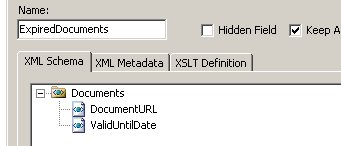
Datafields: You'll by now have noticed the three check boxes at the bottom of the screen when creating a datafield in the K2.net Studio. Don't ignore them! 'Keep Audit Trail' will result in the K2 server making a copy of the datafield every time its value change. This option should not be checked by default. Only enable this for datafields that needs to be audited (for tracking or compliance reasons). 'Data On Demand' means that the value of the datafield is only loaded when its accessed and not when the process instance is created. A ProcessInstance object is created (and all the non-data on demand datafields are loaded) whenever a worklist item or server item is loaded. Only leave this option unchecked for datafields that you will access often to make sure they are readily available. For datafields that are large or datafields that are not often accessed, ticking this option will create a small delay when accessing them, but will greatly improve the performance of loading a worklist item or server item.
Worklist performance: This is where most clients experience bottlenecks in performance and its very often due to a bad design. Consider the best practise for datafields to improve access to a worklist. Secondly, don't load a users full worklist if its not required. Use the WorklistCriteria object when loading the worklist in order to paginate and optimally filter the result.
Connections: The rule of 'acquire late, release early' for any resources that your application use applies to the K2.net Connection object as well. In plain English this means, open the connection to the K2 server as late as possible and close it as soon as you are done (except if you need to keep holding onto the connection to improve multiple transactions that follow each other). When you are done, close the connection, don't be lazy and just conveniently forget about it. The Connection object itself might be a managed object in .NET but the resource you are consuming, the actual connection to the K2 server, is not. Same goes for SQL connections, files handles, etc. Because the K2 Connection object does not implement IDisposable (and even if it did, (repeat after me) you must still close the connection), I normally use this simple pattern to ensure that my connection is closed:
K2ROM.Connection con;
try
{
con = new K2ROM.Connection();
con.Open();
// use it here
}
catch (Exception ex)
{
// handle exception here
}
finally
{
if (con != null) con.Close();
}
Error Handling: Things go wrong, bottom line. You must build exception handling into your process. Exception handling can be added as low as event and line rule level, up to a general exception handler for the process. Build exception handling that can work around the error in line with the business process. As a last resort, allow the exception to be bubbled up to the K2 server.
Code location: Although there has been massive improvements in the code editor in K2.net Studio, consider a better, re-usable and more maintainable architecture by writing your code in VS.NET and building a referenced assembly. You can pass any event sensitive context object from your process into your assembly by setting a reference to the K2ROM and KO libraries in your assembly.
Log file performance: Once your solution has been tested and rolled out, disable the log file output of the K2.net server in the Service Manager - if its not needed. Depending on the amount of activity on your server, writing a log file can impact on the server's performance.
Process data v.s. external data: K2.net 2003 is a great workflow engine, its a bad data store. You don't store your MP3 files in your email client, so don't store your application data in your process. Store only in the process data that's related to the workflow. If your workflow processes a document, keep the document in its own store (network share, SharePoint, etc.) and work with a reference to the document in your process. If your workflow processes a customer, store the customer record in a database and work with the id in the process. Ask yourself the question, 'who is the owner of this data'. If its not K2, don't store it in K2.
Large destination rules: Few developers realise that the K2 server creates an instance of an Activity for each destination in the destination rule. This means that an Activity with a hundred destinations will result in the K2 server creating a 100 instances of the Activity in the transaction database. A service pack 3 feature allows you to limit this to one instance and should be considered where performance is important and multiple Activity instances (i.e. Activity datafields) are not required.
Debugging: By running the K2 server in interactive mode, you can view the real time log output of the server. Write plenty of trace information in your process - this does not only help tracking development bugs, but will help to assist finding the audit and source of an issue that surface during production.
I'll keep building this list as I stumble across issues.
Thursday, September 21, 2006

Monday, January 30, 2006
K2.net client event serial numbers and emails
Long time no blog.
Interesting one I picked up the other day. I was putting a URL in an email notification for a user (destination) to complete a worklist item. The user kept on reporting that under some conditions, he would hit the link, but the page would not open correctly because the serial number that was past of the URL query string, got cut off at a comma.
K2.net builds serial numbers for client events in order to correctly identify a specific client event for a given activity instance:
The format of the serial number is something like SERVER,xx,yy. When I included the URL of the client page in the email notification to the destination, his email client would sometimes (if the line needs to be line wrapped) cut the URL into two lines in the email. It would do this at one of the commas.
To avoid this, I had to UrlEncode the serial number part in the URL. This will avoid that the URL gets cut in two pieces (even if the line gets line wrapped) when included in an text email.
The code looks like this:
sn = System.Web.HttpUtility.UrlEncode(K2.SerialNumber);
URL before using HttpUtility.UrlEncode:
http://server/sites/page.aspx?sn=SRV,12,13
URL after using HttpUtility.UrlEncode:
http://server/sites/page.aspx?sn=SRV%2c12%2c13
Interesting one I picked up the other day. I was putting a URL in an email notification for a user (destination) to complete a worklist item. The user kept on reporting that under some conditions, he would hit the link, but the page would not open correctly because the serial number that was past of the URL query string, got cut off at a comma.
K2.net builds serial numbers for client events in order to correctly identify a specific client event for a given activity instance:
How does k2 generate the serial number?
http://forum.k2workflow.com/viewtopic.php?t=2&sid=6b1b93ac90bad66f0c700a8bef7d910e
The Serial Number is unique for each event instance within the process instance. This means that if you have an activity that contains 2 events (for example a server and client event), then during the execution of the process, each of these will have their own unique serial number. The serial number is basically the most granular unique identifier within the process. It identifies a single step, within a specific activity instance, within a specific process instance, and if it is a client event, the serial number also uniquely identifies which user it is allocated to. Therefore, if an activity is set to have 3 users in it's destination rule, then for the client event, there will be 3 different serial numbers for each user that the client event is sent to.
The format of the serial number is something like SERVER,xx,yy. When I included the URL of the client page in the email notification to the destination, his email client would sometimes (if the line needs to be line wrapped) cut the URL into two lines in the email. It would do this at one of the commas.
To avoid this, I had to UrlEncode the serial number part in the URL. This will avoid that the URL gets cut in two pieces (even if the line gets line wrapped) when included in an text email.
The code looks like this:
sn = System.Web.HttpUtility.UrlEncode(K2.SerialNumber);
URL before using HttpUtility.UrlEncode:
http://server/sites/page.aspx?sn=SRV,12,13
URL after using HttpUtility.UrlEncode:
http://server/sites/page.aspx?sn=SRV%2c12%2c13
Wednesday, November 02, 2005
Tuesday, November 01, 2005
WSS SP2 event handler changes
Updated 19/12/2005
Windows SharePoint Services SP2 Event Handler changes - incompatible with K2.net SP2a
Microsoft recently released WSS SP2 that contains some nice enhancements to the core WSS engine, new site and list templates and much better integration capabilities with Microsoft InfoPath 2003.
Some much needed updates to the way SharePoint event handlers impersonate users at last took place in this service pack.
Unfortunately, this influences the way current event handlers that run on the non-SP2 object model. For this reason, the event handlers from SharePoint that invokes K2.net processes does not work after upgrading your SharePoint to Service Pack 2. K2 current recommends avoiding upgrading SharePoint until a hot fix for K2.net 2003 is available.
Added: K2.net 2003 SP2a hot fix released - see comments.
Windows SharePoint Services SP2 Event Handler changes - incompatible with K2.net SP2a
Microsoft recently released WSS SP2 that contains some nice enhancements to the core WSS engine, new site and list templates and much better integration capabilities with Microsoft InfoPath 2003.
Some much needed updates to the way SharePoint event handlers impersonate users at last took place in this service pack.
Unfortunately, this influences the way current event handlers that run on the non-SP2 object model. For this reason, the event handlers from SharePoint that invokes K2.net processes does not work after upgrading your SharePoint to Service Pack 2. K2 current recommends avoiding upgrading SharePoint until a hot fix for K2.net 2003 is available.
Added: K2.net 2003 SP2a hot fix released - see comments.
Friday, October 28, 2005
A K2.net 2003 Looping Pattern
Its about time...
Ever so often a student ask me about some K2.net 2003 best practices. Mostly there's a hidden question behind the obvious... how to solve a specific business problem using this great workflow engine's process mapper.
I've decided to document a view of my own experiences. This month I'll overview a solution a client requested regarding scheduled document checking in a SharePoint document library. Since the rest of the solution was all done in SharePoint 2003 and K2.net 2003, I was eager to implement this solution of checking a bunch of documents using the exact same technologies.
As with all best pratices and patterns, note:
My client's got a document library with hundreds of documents. The document library contains various document properties (meta data) - one being the date that a document is valid until. Once a document's valid until date is reached, certain actions need to take place. These actions already exist in another K2 process.
Solution:
Its a simple problem, and writing some kind of process that will (1) start periodically, (2) load some configuration, (3) load all the documents from the document library that's about to expire, (4) loop them and, for each, call a process that will take some actions on them using the K2.net IPC event. This process is then scheduled to run periodically (using the standard Windows task scheduler I gave my client the control).
Lets look at the K2.net process I've mapped out for this:
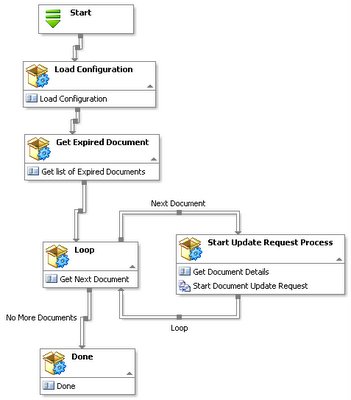
The first activity merely loads some configuration settings. The only configuration I load here is the DayOffset used for determining when a document is expired.
The second activity connects to the SharePoint document library and loads all the documents that is about to expire based on the configuration settings from the first activity.
Ever so often a student ask me about some K2.net 2003 best practices. Mostly there's a hidden question behind the obvious... how to solve a specific business problem using this great workflow engine's process mapper.
I've decided to document a view of my own experiences. This month I'll overview a solution a client requested regarding scheduled document checking in a SharePoint document library. Since the rest of the solution was all done in SharePoint 2003 and K2.net 2003, I was eager to implement this solution of checking a bunch of documents using the exact same technologies.
As with all best pratices and patterns, note:
- Its a recommended, repeatable suggestion for solving a common, repeated problem. Its not a rule or the only way to solve the problem.
My client's got a document library with hundreds of documents. The document library contains various document properties (meta data) - one being the date that a document is valid until. Once a document's valid until date is reached, certain actions need to take place. These actions already exist in another K2 process.
Solution:
Its a simple problem, and writing some kind of process that will (1) start periodically, (2) load some configuration, (3) load all the documents from the document library that's about to expire, (4) loop them and, for each, call a process that will take some actions on them using the K2.net IPC event. This process is then scheduled to run periodically (using the standard Windows task scheduler I gave my client the control).
Lets look at the K2.net process I've mapped out for this:
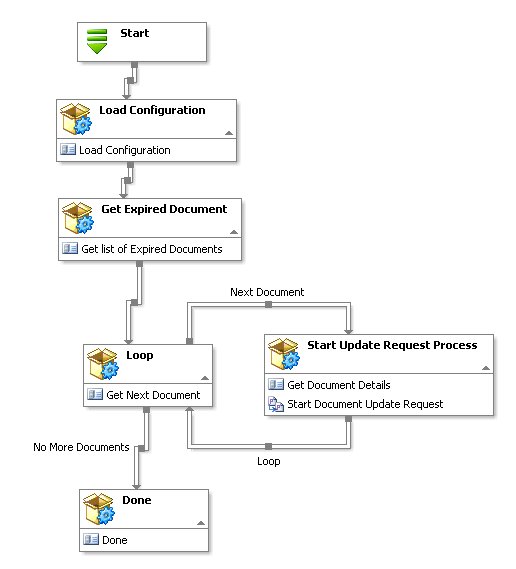
The first activity merely loads some configuration settings. The only configuration I load here is the DayOffset used for determining when a document is expired.
The second activity connects to the SharePoint document library and loads all the documents that is about to expire based on the configuration settings from the first activity.
- To enable my client to control the process (and other processes part of this solution) I've build a simple key/value custom list in SharePoint that allows them to control processes related settings. This is a great way to hide the actual process from the user but give them the power to control the process without knowing how to configure, build and export K2.net processes when they want to make changes.
The list of documents that should be processed are loaded into a K2.net XML datafield by the Get Expired Documents activity. The XML data field, ExpiredDocuments, will be the iteration that will be looped in the K2.net process. It contains a list of document URLs of the expired documents based on my criteria loaded in the first activity.
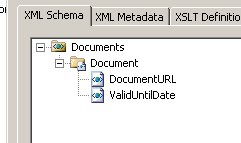
The other important K2.net datafield it the DocumentCounter datafield. Its the iterator of the loop.
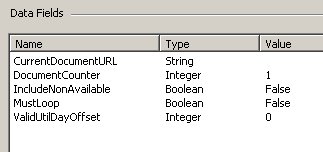
The third activity is the most important part of this pattern. It is the looping structure. Using a combination of a process datafield as the iterator, a XML process datafield as the iteration and line rules as looping conditions, you can build pretty much any looping structure in K2.net.
This activity will loop the list of document URLs - every time selecting the next document from the XML process datafield and making it the current document. The DocumentCounter is updated and the MustLoop datafield indicates if the loop should terminate. This is all done within a single server event in the main looping control activity.
public void Main(ServerEventContext K2)
{
K2.Synchronous = true;
// get the list of expired
documents from the xml datafield string DocsField;
DocsField =
K2.ProcessInstance.XmlFields["ExpiredDocuments"].Value;
// create a xml document and load the xml datafield
System.Xml.XmlDocument oXmlDoc = new System.Xml.XmlDocument();
oXmlDoc.LoadXml(DocsField);
// select the
document element at the current position
int DocumentCounter =
(int)K2.ProcessInstance.DataFields["DocumentCounter"].Value;
System.Xml.XmlNode oXmlDocument =
oXmlDoc.SelectSingleNode("Documents/Document[position() = " +
DocumentCounter.ToString() + "]");
// if there's a document in this position set the 'CurrentDocumentURL' datafield,
// set the 'MustLoop' datafield to true to enter the loop and
// increment the 'DocumentCounter' datafield
// ELSE
// exit the loop by setting 'MustLoop' to false
if (oXmlDocument != null)
{
K2.ProcessInstance.DataFields["CurrentDocumentURL"].Value =
oXmlDocument.SelectSingleNode("DocumentURL").InnerText;
((int)K2.ProcessInstance.DataFields["DocumentCounter"].Value)++;
K2.ProcessInstance.DataFields["MustLoop"].Value = true;
}
else
{
K2.ProcessInstance.DataFields["MustLoop"].Value = false;
}
}
Since the architecture of K2.net does not allow me to create a code block that will span multiple events (never mind multiple activities), I need to build a loop over activities by using a combination of lines and a iterator to keep track of the current document being processed. I will use the DocumentCounter process datafield that will keep the value of the current position within the
Documents/Document[position() = '1 based index']
This query will return null into the XmlNode object if there is not a element at the given position (in my solution this indicates that I've iterated all the
From here the process will either flow into the loop if there's another document to be processed or the loop with terminate if all documents was processed by using the MustLoop process datafield based on the line rules leaving the Loop activity.
By using XML process datafields in K2.net, you can build and loop lists of items with ease. And don't be scrared to dive into the code level of K2.net - its THE most powerfull feature of K2.net - having the .NET class libraries right there for you to write realy powerful workflow.
If you have to allow a mortal, um, non-developer to configure the process, just take your code and hide it in an assembly. Have the non-developer call your code using the Assembly Wizard event thats part of K2.net 2003 SP2a.
Subscribe to:
Posts (Atom)