I will be presenting a webinar where I will explore the KnowledgeLake suit and specifically look at now to access and use business data from a line of business system to index documents into SharePoint. Please visit our web site if you are interested in joining.
http://www.dynamyx.com/events/event/16-how-to-unify-your-business-with-sharepoint-document-management
Dynamyx can help you resolve these problems by connecting your business systems to content stored in your SharePoint portal. From within these applications, employees from across the organisation can gain immediate access to any SharePoint document the moment it is needed.
Join us for our live webinar and learn how Dynamyx empowers employees to search, reference and archive critical SharePoint documents from business systems - such as contracts, regulated documents, client correspondence, insurance forms, credit applications with line of business data from Broking, CRM, Policy Administration Finance systems - all without leaving their familiar Business System and Microsoft Outlook, Word and Excel environments.
Sunday, September 01, 2013

Wednesday, November 16, 2011
Now also on Making Flow Work
A collaborative Dynamyx effort now features world class and experienced workflow bloggers at: http://www.makingflowwork.com/
Wednesday, August 18, 2010
My next talk - ECM and Instance Management
16/09/2010 09h00 - Book at http://www.dynamyx.com/
Microsoft Cardinal Place, Victoria, London
Morning brief about SharePiont as an ECM and instance/case management platform where we will discuss the ability of using SharePoint for case management and document imaging. We explore our reliance on paper as a token for driving a business process and how that keeps us well away from moving toward a paperless office.
Live demonstrations will include an overview of the KnowledgeLake and K2 software platforms for SharePoint.
Microsoft Cardinal Place, Victoria, London
Morning brief about SharePiont as an ECM and instance/case management platform where we will discuss the ability of using SharePoint for case management and document imaging. We explore our reliance on paper as a token for driving a business process and how that keeps us well away from moving toward a paperless office.
Live demonstrations will include an overview of the KnowledgeLake and K2 software platforms for SharePoint.
Sunday, October 04, 2009
BizTalk Messagebox Viewer
13th Oct 2009 8pm
Jean-Pierre Auconie, Technical Lead and Engineer from the EMEA BizTalk Team is going to join us for this session where he will talk us through the use of the Messagebox Viewer and Terminator tools which he has developed. Jean-Pierre will also discuss where this fits compared to some of the other community tools for BizTalk.
Jean-Pierre will also discuss some of the problems he has faced in the field where these tools have been useful and we will close with a Q&A session where people can draw from his experiences.
Registration: http://sbugminimessageboxviewer.eventbrite.com/
Jean-Pierre Auconie, Technical Lead and Engineer from the EMEA BizTalk Team is going to join us for this session where he will talk us through the use of the Messagebox Viewer and Terminator tools which he has developed. Jean-Pierre will also discuss where this fits compared to some of the other community tools for BizTalk.
Jean-Pierre will also discuss some of the problems he has faced in the field where these tools have been useful and we will close with a Q&A session where people can draw from his experiences.
Registration: http://sbugminimessageboxviewer.eventbrite.com/
Friday, January 30, 2009
Professional K2 blackpearl
 Our book is out! And an excelent overview of what BPM realy means all the way through to deep under the hood of K2 blackpearl.
Since this is the first book on K2 blackpearl, you will find a broad range of topics in this book, from the market in which K2 blackpearl is aimed to the architecture of the platform, from how to approach process design to developing your own custom user manager.
Friday, November 21, 2008
Learn from Microsoft and K2 how Nissan drive more productivity from SAP
Learn from Microsoft and K2 how Nissan drive more productivity from SAP
Microsoft and K2 would like to invite you to an afternoon session of presentations and networking to help you further your SAP investment. After refreshments and a welcome from your hosts you will gain an insight into how Microsoft works closely with SAP and their future strategy as partners. Also learn how one of our customers, Nissan, enhanced their productivity with workflow and SAP linking to enable updates, amends and automatic postings with limited user intervention. This session will be hosted by the Dynamyx Business analyst, who will explain the business drivers and processes involved, the project manager sharing experiences gained in delivering the solution across the region, and the systems architect who will present details on how to achieve scalability when linking workflow to SAP.
The event will end with networking and drinks to wish you all the best of the season with the backdrop of the night time city view.
Date: 10 December 2008
Time: 14:00 – 17:30
Venue: Radisson Edwardian Hampshire
To register call 0870 166 6628 or click here to register online.
Microsoft and K2 would like to invite you to an afternoon session of presentations and networking to help you further your SAP investment. After refreshments and a welcome from your hosts you will gain an insight into how Microsoft works closely with SAP and their future strategy as partners. Also learn how one of our customers, Nissan, enhanced their productivity with workflow and SAP linking to enable updates, amends and automatic postings with limited user intervention. This session will be hosted by the Dynamyx Business analyst, who will explain the business drivers and processes involved, the project manager sharing experiences gained in delivering the solution across the region, and the systems architect who will present details on how to achieve scalability when linking workflow to SAP.
The event will end with networking and drinks to wish you all the best of the season with the backdrop of the night time city view.
Date: 10 December 2008
Time: 14:00 – 17:30
Venue: Radisson Edwardian Hampshire
To register call 0870 166 6628 or click here to register online.
Wednesday, October 29, 2008
Breakfast Briefing: Microsoft based Business Process Management
Discover the benefits of embracing Business Process Management using Microsoft based technologies.
We will be presenting Microsoft® BizTalk® Server and K2 blackpearl focused around business-process automation and application-to-application integration. Dynamyx in Partnership with K2 and Microsoft invites you to join us for a breakfast seminar in London, UK. Breakfast will be available from 8:30.
30 October 2008
Arrival (8:00 - 8:30)
Light Breakfast (8:30 - 9:00)
Welcome from Microsoft Mr Harsha Karunaratne, SOA and Process Platform Technical Specialist (9:00 - 9:30)
Business Benefits of BPM Mr Ruan Scott, K2 VP EMEA (9:30 - 10:00)
Scenario Demonstration Mr Gabriel Malherbe, Dynamyx Technical Director (10:00 - 10:45) Q&A (10:45 - 11:00)
A technical workshop will be held from 11:00 to 12:00.
http://www.dynamyx.net/resources_EventsReg.aspx?EventID=74950
We will be presenting Microsoft® BizTalk® Server and K2 blackpearl focused around business-process automation and application-to-application integration. Dynamyx in Partnership with K2 and Microsoft invites you to join us for a breakfast seminar in London, UK. Breakfast will be available from 8:30.
30 October 2008
Arrival (8:00 - 8:30)
Light Breakfast (8:30 - 9:00)
Welcome from Microsoft Mr Harsha Karunaratne, SOA and Process Platform Technical Specialist (9:00 - 9:30)
Business Benefits of BPM Mr Ruan Scott, K2 VP EMEA (9:30 - 10:00)
Scenario Demonstration Mr Gabriel Malherbe, Dynamyx Technical Director (10:00 - 10:45) Q&A (10:45 - 11:00)
A technical workshop will be held from 11:00 to 12:00.
http://www.dynamyx.net/resources_EventsReg.aspx?EventID=74950
Wednesday, May 28, 2008
Writing custom code in a K2 blackpearl client event
Long time no blog...
Topic that’s had some recent airtime in Dynamyx. How to, or more specific, what’s the most correct way to write custom code behind a K2 blackpearl client event. This specific use case came about when we had to send an email from the client event that needed a high level of customization.
Firstly, looking back at the K2.net 2003 days, this was a simple right click on the client event and hacking away at the generated code. The drawback was that you bought a one way ticket... you could never run the wizard again and retain your custom code. The new K2 blackpearl authoring model allow us to customize the underlying code of an event but maintain the integrity and ability to re-run the event's wizard.
The question is, where do you put your code then?
Let’s start by looking at the code behind a client event. Right click on the client event and select the View Code Event Item option:

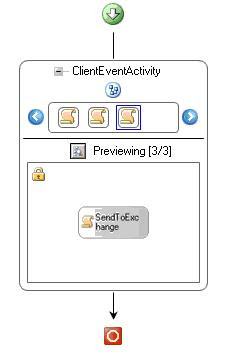 The idea is to add you own WF code activity either before or after the core client event code (depending on what you want to do). In my example I dragged a simple WF code activity from the Visual Studio toolbox and dropped it at the end of the schedule. To get to the event handler of the code activity, right click on it and select Generate Handlers:

And write you own custom code:
Topic that’s had some recent airtime in Dynamyx. How to, or more specific, what’s the most correct way to write custom code behind a K2 blackpearl client event. This specific use case came about when we had to send an email from the client event that needed a high level of customization.
Firstly, looking back at the K2.net 2003 days, this was a simple right click on the client event and hacking away at the generated code. The drawback was that you bought a one way ticket... you could never run the wizard again and retain your custom code. The new K2 blackpearl authoring model allow us to customize the underlying code of an event but maintain the integrity and ability to re-run the event's wizard.
The question is, where do you put your code then?
Let’s start by looking at the code behind a client event. Right click on the client event and select the View Code Event Item option:
You'll be presented with the XOML schedule that makes ups the client event:
The idea is to add you own WF code activity either before or after the core client event code (depending on what you want to do). In my example I dragged a simple WF code activity from the Visual Studio toolbox and dropped it at the end of the schedule. To get to the event handler of the code activity, right click on it and select Generate Handlers:And write you own custom code:

Thursday, December 20, 2007
Actions leads to Outcomes
In enterprise solutions it’s impossible to keep logic in one place. We are faced with BPM rules engines, line of business applications with their own schemas, input and output limitations, business rules, UI rules, drinking rules and speed cameras! Although it would be great to have them all in one place, as with red tape in governing organs we cope with adapting our senses to read and adhere to this logic in an easy way. K2 blackpearl makes a few effective attempts at centralizing logic and offering us tools to use logic from elsewhere.
In K2 2003 a user task was a good example where we often had routing logic in the workflow that had to be duplicated in the UI. For workflow routing our UI has to know what options the user had when auctioning a task and then the succeeding rule and all line rules out of the activity had to know about this as well. Maintenance was a nightmare.
In order to centralize routing logic, my team built a complete framework on K2.net 2003 that allowed us to automatically render the user interface for a workflow client event by looking at the available lines out of an activity that hosted the client event (if you are not bothered about the battles we had in 2003 or are a K2 blackpearl only client, skip to ‘In K2 blackpearl” sections).
In K2 2003
Here is the sample of the framework in action:

Logic of the workflow is automatically available in our business entities by purely inheriting from a specific base class (Customer in this example with an associated Customer Approval workflow instance) so accessing the logic defined in the workflow via client UI code looks like this:
Public Sub LookAtCustomerActionsAvailable()
' load a biz entity
Dim cust As Customer = _
RemoteServer.GeneralManager.Load(Of Model.Customer)(1)
' get the workflow context using the framework
RemoteServer.WorkflowManager.PopulateContext(cust)
' get the list of actions from the biz entity
For Each action As Action In cust.ActionsAvailable
Assert.IsNotNull(action, "bollocks test")
Next
' take the first action
cust.ActionToBeTaken = cust.ActionsAvailable(0)
' save the entity and action the workflow using framework
RemoteServerHelper.GeneralManager.SaveEntityObject(cust);
End Sub
Powerful feature, but because it is our own framework extensions on top of K2 2003, it is hard to maintain. For example, all our client events, lines, succeeding rules and line rules have to adhere to our framework requirements, i.e. “what action will lead to what line and what line represents a specific outcome”. We have to add and maintain XML stubs on all these entities, i.e. here is a line telling the framework what action will lead to its outcome:

Now that K2 blackpearl is available with the concept of being able to take a client action that leads to an outcome build into the product, life is much easier.
In K2 blackpearl
Blackpearl defines the concept of a client event in the workflow being aware of what actions can be taken on it. This is defined when creating the client even in the process designer. The wizard will also allow you to define outcomes and link the action that a user can take with a specific outcome based on your own rule set. Once the client receives the task at run-time, the task contains the available actions and the UI can automatically render this.
Here is a sample process:

When I added the client event, I automatically added two actions with two outcomes, North and South. I also asked the client event wizard to create a line for each outcome… not a single line of code needed for this.
Once I’ve started a new process instance and look at the allocated client task, I can see the two actions available: - this picture from the Workspace work list:

Job done! I can link these outcomes to my UI using either the various UI integration events available (InfoPath Client Event and Form Generation Client Event) – zero code required.
Alternatively I could render my own UI using the Client API. This sample code opens a connection to the K2 server, opens a task based on its serial number and then loops the available actions. It then takes the first action on the task in order to complete the client event:
static void LoadActions() {
// SourceCode.Workflow.Client.Connection now implements
// IDisposable...
using (Connection con = new Connection()) {
try {
// open connection and load task
con.Open("localhost");
WorklistItem task = con.OpenWorklistItem("SERIALNUMBER");
// loop the actions
foreach (Action action in task.Actions) {
Console.WriteLine(action.Name);
}
// action task (assume there is at least one)
task.Actions[0].Execute();
}
catch (Exception exception) { throw exception; }
finally { con.Close(); }
}
}
Thanks to the ambitions of the development team at Dynamyx that inspired the creation of the Dynamyx K2 framework that’s made life so much easier for us and our clients. I dedicate this blog entry to them. Rob, Ian, Trent, Kenny, Carlos and JT.
In K2 2003 a user task was a good example where we often had routing logic in the workflow that had to be duplicated in the UI. For workflow routing our UI has to know what options the user had when auctioning a task and then the succeeding rule and all line rules out of the activity had to know about this as well. Maintenance was a nightmare.
In order to centralize routing logic, my team built a complete framework on K2.net 2003 that allowed us to automatically render the user interface for a workflow client event by looking at the available lines out of an activity that hosted the client event (if you are not bothered about the battles we had in 2003 or are a K2 blackpearl only client, skip to ‘In K2 blackpearl” sections).
In K2 2003
Here is the sample of the framework in action:
Logic of the workflow is automatically available in our business entities by purely inheriting from a specific base class (Customer in this example with an associated Customer Approval workflow instance) so accessing the logic defined in the workflow via client UI code looks like this:
' load a biz entity
Dim cust As Customer = _
RemoteServer.GeneralManager.Load(Of Model.Customer)(1)
' get the workflow context using the framework
RemoteServer.WorkflowManager.PopulateContext(cust)
' get the list of actions from the biz entity
For Each action As Action In cust.ActionsAvailable
Assert.IsNotNull(action, "bollocks test")
Next
' take the first action
cust.ActionToBeTaken = cust.ActionsAvailable(0)
' save the entity and action the workflow using framework
RemoteServerHelper.GeneralManager.SaveEntityObject(cust);
End Sub
Powerful feature, but because it is our own framework extensions on top of K2 2003, it is hard to maintain. For example, all our client events, lines, succeeding rules and line rules have to adhere to our framework requirements, i.e. “what action will lead to what line and what line represents a specific outcome”. We have to add and maintain XML stubs on all these entities, i.e. here is a line telling the framework what action will lead to its outcome:
Now that K2 blackpearl is available with the concept of being able to take a client action that leads to an outcome build into the product, life is much easier.
In K2 blackpearl
Blackpearl defines the concept of a client event in the workflow being aware of what actions can be taken on it. This is defined when creating the client even in the process designer. The wizard will also allow you to define outcomes and link the action that a user can take with a specific outcome based on your own rule set. Once the client receives the task at run-time, the task contains the available actions and the UI can automatically render this.
Here is a sample process:
When I added the client event, I automatically added two actions with two outcomes, North and South. I also asked the client event wizard to create a line for each outcome… not a single line of code needed for this.
Once I’ve started a new process instance and look at the allocated client task, I can see the two actions available: - this picture from the Workspace work list:
Job done! I can link these outcomes to my UI using either the various UI integration events available (InfoPath Client Event and Form Generation Client Event) – zero code required.
Alternatively I could render my own UI using the Client API. This sample code opens a connection to the K2 server, opens a task based on its serial number and then loops the available actions. It then takes the first action on the task in order to complete the client event:
static void LoadActions() {
// SourceCode.Workflow.Client.Connection now implements
// IDisposable...
using (Connection con = new Connection()) {
try {
// open connection and load task
con.Open("localhost");
WorklistItem task = con.OpenWorklistItem("SERIALNUMBER");
// loop the actions
foreach (Action action in task.Actions) {
Console.WriteLine(action.Name);
}
// action task (assume there is at least one)
task.Actions[0].Execute();
}
catch (Exception exception) { throw exception; }
finally { con.Close(); }
}
}
Thanks to the ambitions of the development team at Dynamyx that inspired the creation of the Dynamyx K2 framework that’s made life so much easier for us and our clients. I dedicate this blog entry to them. Rob, Ian, Trent, Kenny, Carlos and JT.
Tuesday, December 18, 2007
K2 blackpearl SP1 features realtime viewflow
I've had access to some beta's of K2 blackpearl SP1. I could not wait for it to hit the streets and now that it’s been unleashed, I'll highlight one of the features included.
One of the most powerful reasons for adoption of K2 is its ability to visualise a process at run-time. Although I've heard varied opinions about this in the industry, everything from 'please don't show that to the user, it will confuse the hell out of them' to 'that’s why we bought K2', the viewflow has always been a hit. And now it’s just been given a dose of concentrated Brazilian guarana... real time capability!
Here is a simple process I created in the K2 blackpearl Visual Studio designer:

I exported it to the K2 server and started a new instance. The first activity will generate a client task, so I head straight for the Workspace, and click on the dropdown of my task.


One of the most powerful reasons for adoption of K2 is its ability to visualise a process at run-time. Although I've heard varied opinions about this in the industry, everything from 'please don't show that to the user, it will confuse the hell out of them' to 'that’s why we bought K2', the viewflow has always been a hit. And now it’s just been given a dose of concentrated Brazilian guarana... real time capability!
Here is a simple process I created in the K2 blackpearl Visual Studio designer:
I exported it to the K2 server and started a new instance. The first activity will generate a client task, so I head straight for the Workspace, and click on the dropdown of my task.
From there I can open the viewflow of the process. Look at this:
There is also the option to view the viewflow in realtime, so I enable it, go back to my worklist and complete my pending task. Within a few seconds the viewflow automatically updates the state:
Monday, December 17, 2007
K2 blackpearl SP1 released
From Technical Bulletin #7:
K2 blackpearl™, the centerpiece of the new K2 platform, was released in August, and Service Pack 1 is now available.
More than 300 customers and partners have already downloaded K2 blackpearl, and a US-based oil and gas company was the first organization to go live with an enterprise implementation for the management of wells. More than a dozen additional companies expect to deploy K2 blackpearl to production in the coming months.
K2 blackpearl SP1 includes many fixes and enhancements to K2 blackpearl, based on extensive customer and internal feedback. Some of the key enhancements include:
• Out-of-box reports have been enhanced.
• A Web-based ViewFlow has been included with auto-refresh and click-through for additional details and steps.
• Users can now access the task lists of people that report to them.
• Roles are now resolved in real-time.
• AD groups can now serve as destinations and are resolved at runtime.
• Memory and performance fixes have reduced the memory footprint and increased the stability and
responsiveness of K2 Designer for Visual Studio and the K2 Web Designer for SharePoint.
• A Server Logging Framework and Server Performance Monitoring, with Windows Performance Monitor
integration, have been added.
K2 blackpearl™, the centerpiece of the new K2 platform, was released in August, and Service Pack 1 is now available.
More than 300 customers and partners have already downloaded K2 blackpearl, and a US-based oil and gas company was the first organization to go live with an enterprise implementation for the management of wells. More than a dozen additional companies expect to deploy K2 blackpearl to production in the coming months.
K2 blackpearl SP1 includes many fixes and enhancements to K2 blackpearl, based on extensive customer and internal feedback. Some of the key enhancements include:
• Out-of-box reports have been enhanced.
• A Web-based ViewFlow has been included with auto-refresh and click-through for additional details and steps.
• Users can now access the task lists of people that report to them.
• Roles are now resolved in real-time.
• AD groups can now serve as destinations and are resolved at runtime.
• Memory and performance fixes have reduced the memory footprint and increased the stability and
responsiveness of K2 Designer for Visual Studio and the K2 Web Designer for SharePoint.
• A Server Logging Framework and Server Performance Monitoring, with Windows Performance Monitor
integration, have been added.
Monday, July 09, 2007
K2 Underground
Dear Blog-surfer,
Most of my blog has always been dedicated to articles and write-ups on K2.net. As I recently joined the K2 Insider community, my K2.net efforts will be directed to the new K2.net community portal, www.k2underground.com.
I'll keep this blog up to date with other articles and stories.
The Naked Programmer
Most of my blog has always been dedicated to articles and write-ups on K2.net. As I recently joined the K2 Insider community, my K2.net efforts will be directed to the new K2.net community portal, www.k2underground.com.
I'll keep this blog up to date with other articles and stories.
The Naked Programmer
Monday, May 07, 2007
Using a K2.net 2003 process as a 'function call'
Although this kind of thing will be much easier in K2.net [BlackPearl] using SmartFunctions, sometime we would like to run a K2.net 2003 process to determine the outcome of a set of rules only. Normally this process will not have any client interaction as it mearly takes some input, apply a set of rules using the K2.net line rules, and output some result. Doing this we get the K2.net visual representation of our business rules and the outcome of it.
The calling code treat the K2.net process instance as a method call, creating a new process instance, passing the initial data into the process via datafields and then wait for the process instance to reach an 'answer point', then read the answer from the process instance.
The assumption is that there is alway only one outcome from the business rules.
Firstly, our process. This is a very simple process that will set some datafield called Result to true.

The code inside the True server event looks like this:
Sub Main(ByVal K2 As ServerEventContext)
' make this server event wait
K2.Synchronous = False
' store the server event's serial in a process level datafield
K2.ProcessInstance.DataFields("WaitingServerEventSerial").Value = K2.SerialNumber
' set the result of this process, i.e. the business rule
K2.ProcessInstance.DataFields("Result").Value = True
End Sub
Note that we set the Synchronous property to False. This will make this server event wait until we instruct it to complete. We need to do this so that we can grab the outcome of the business rules (True in this example, stored in the datafield called Result). For the calling code to get to this server event to complete it, the server event store its serial number in a process level datafield called WaitingServerEventSerial.
The calling code looks this this:
Sub Main()
Dim myConn As SourceCode.K2ROM.Connection = Nothing
Try
' this opens a connection to the K2 server
myConn = New SourceCode.K2ROM.Connection
myConn.Open("localhost")
' this is the rules based process
Dim myProc As SourceCode.K2ROM.ProcessInstance
Dim piString As String = "Async\Rules"
' this creates the process instance
myProc = myConn.CreateProcessInstance(piString)
' this starts the process instance but does not return control to this code
' until the process hits a waiting point. in this case the server event thats
' been marked to be K2.Synchronous = False
myConn.StartProcessInstance(myProc, True)
' save the process instance ID and use it to open the process again
Dim myProcID = myProc.ID
myProc = myConn.OpenProcessInstance(myProcID)
' get the result
Dim result As Boolean = CType(myProc.DataFields("Result").Value, Boolean)
' and very important, tell the server event to complete (by getting the waiting server
' event's serial number from the process instance datafield. if we don't do this then the
' process instance will stay active
Dim waitingServerEventSerial As String = myProc.DataFields("WaitingServerEventSerial").Value.ToString()
Dim waitingServerEvent As SourceCode.K2ROM.ServerItem = myConn.OpenServerItem(waitingServerEventSerial)
waitingServerEvent.Finish()
Console.WriteLine("Result is " & result.ToString())
Catch ex As Exception
Console.WriteLine(ex.ToString)
Finally
If Not myConn Is Nothing Then
myConn.Close()
End If
End Try
Console.ReadLine()
End Sub
The client code creates and starts a process instance. Note the Sync property is set to True when starting the process instance. This will make sure that the StartProcessInstance method will not return control to the calling code until the process hits a client event for Async server event. In our example this Async server event is the outcome of the business logic that we are waiting for.
Once this point is reached and control is passed back to our client code we reload the process instance, get the outcome of the business rules via the Result datafield and then instruct the waiting server event to finish by picking its serial number up from the datafield WaitingServerEventSerial.
PS. Thanks Richard Neal and Mark Jones who's questions prompted me to do this article.
PSS. Often clients ask me to code in the language they use, so I've decided to at last also post a sample in VB.NET. Also note that I always use a simple pattern where I always make sure that the connection to the K2.net server is closed.
Wednesday, April 11, 2007
Microsoft Virtual PC 2007 and me Dell Inspiron 6000
What a battle... took me days to find a solution to this; installed VPC 2007 on my Dell Inspiron (its got the Centrino chipset). The virtual machine would keep on being jittery, slow, and unresponsive. Poor performance all over.
This solved it:
http://codebetter.com/blogs/jeff.lynch/archive/2006/11/28/VPC-2007-Beta_3A00_-Centrino-915-Chipset-Issues.aspx
Like noted, not the perfect fix and eats away nicely at the battery, but it works.
This solved it:
http://codebetter.com/blogs/jeff.lynch/archive/2006/11/28/VPC-2007-Beta_3A00_-Centrino-915-Chipset-Issues.aspx
Like noted, not the perfect fix and eats away nicely at the battery, but it works.
Monday, January 15, 2007
This version or that version?
It might be required to create an instance of a specific version of a process. Some reasons:
0. When exporting a new version of a process, the K2 server makes it the default version automatically. This is a bit of a pain as new instances of the new exported process will be automatically created by clients that don't spesify a spesific version.
1. Export process that's passed QA in development to production and run final pre-production testing before making the process live. In this scenario your user interface will always specify the version of the process when creating an instance.
2. Sometimes changes to a process require changes to the user and/or system interfaces. In this scenario the user interface can create a process on a specific version but should also render itself correctly for a specific version of the process (more about that in the next blog).
Using the K2ROM.dll library one can specify what version of the process to create using the overloaded .CreateProcessinstance method.
SourceCode.K2ROM.Connection con = new SourceCode.K2ROM.Connection();
con.Open("127.0.0.1");
SourceCode.K2ROM.ProcessInstance pi;
pi = con.CreateProcessInstance(@"Project\Process", 2);
This will create an instance of the Process process using version 2.
0. When exporting a new version of a process, the K2 server makes it the default version automatically. This is a bit of a pain as new instances of the new exported process will be automatically created by clients that don't spesify a spesific version.
1. Export process that's passed QA in development to production and run final pre-production testing before making the process live. In this scenario your user interface will always specify the version of the process when creating an instance.
2. Sometimes changes to a process require changes to the user and/or system interfaces. In this scenario the user interface can create a process on a specific version but should also render itself correctly for a specific version of the process (more about that in the next blog).
Using the K2ROM.dll library one can specify what version of the process to create using the overloaded .CreateProcessinstance method.
SourceCode.K2ROM.Connection con = new SourceCode.K2ROM.Connection();
con.Open("127.0.0.1");
SourceCode.K2ROM.ProcessInstance pi;
pi = con.CreateProcessInstance(@"Project\Process", 2);
This will create an instance of the Process process using version 2.
Thursday, November 16, 2006
Repair Error, this instance or a whole lot more?
K2.net 2003 have the great feature of fixing errors on the fly. When any code component in K2 (line rule, start or preceding rule, event, etc.) generates an unhandled exception, the process instance goes into an Error state. These process instances in Error state can be viewed form the K2.net Service Manager by creating a Error Profile and then viewing the errors in that profile.
From here the Service Manager allows you to open the details of the error and various details of the error can be viewed including:
- Process Name
- Error Type
- Error Location
- Error Details
The really nice feature is being able to see the code that generated the error. From this view you can edit the code and repair the error on the fly.
But... what is the effect of doing this? The K2 server stores only ONE copy of this code. Its stored in the _Code table in the transaction DB (normally called K2). By modifying the code in this error details window and hitting the Repair button, the Service Manager updates the code in the _Code table and re-executes the object (in my example an error was created in an Server Event, so the event is re-executed with the new code).
Because there is only one copy of the code, the change made is reflected for ALL process instances and all new process instances. So be careful what you do in your code change as its going to affect way more than just the current process instance! As a matter of fact, even previous version of the process having the same code is updated.
Something else to note is that the original process definition will still contain the un-edited bad code and will also need to be looked at before you re-export the process.
I must apologise to my ex students as I've probably not been explaining the behaviour correctly in the past. We burn and learn. Comments (including possible moans at me) welcome!
Thursday, September 21, 2006
K2.net 2003 development best practices...
I've spent some time with some of the top K2.net UK consultants recently. The topic of K2.net 2003 workflow development best practices came up (again) and I thought I'll share some here. Best practices are subjective, so feel free to share your own opinions.
Datafields: You'll by now have noticed the three check boxes at the bottom of the screen when creating a datafield in the K2.net Studio. Don't ignore them! 'Keep Audit Trail' will result in the K2 server making a copy of the datafield every time its value change. This option should not be checked by default. Only enable this for datafields that needs to be audited (for tracking or compliance reasons). 'Data On Demand' means that the value of the datafield is only loaded when its accessed and not when the process instance is created. A ProcessInstance object is created (and all the non-data on demand datafields are loaded) whenever a worklist item or server item is loaded. Only leave this option unchecked for datafields that you will access often to make sure they are readily available. For datafields that are large or datafields that are not often accessed, ticking this option will create a small delay when accessing them, but will greatly improve the performance of loading a worklist item or server item.
Worklist performance: This is where most clients experience bottlenecks in performance and its very often due to a bad design. Consider the best practise for datafields to improve access to a worklist. Secondly, don't load a users full worklist if its not required. Use the WorklistCriteria object when loading the worklist in order to paginate and optimally filter the result.
Connections: The rule of 'acquire late, release early' for any resources that your application use applies to the K2.net Connection object as well. In plain English this means, open the connection to the K2 server as late as possible and close it as soon as you are done (except if you need to keep holding onto the connection to improve multiple transactions that follow each other). When you are done, close the connection, don't be lazy and just conveniently forget about it. The Connection object itself might be a managed object in .NET but the resource you are consuming, the actual connection to the K2 server, is not. Same goes for SQL connections, files handles, etc. Because the K2 Connection object does not implement IDisposable (and even if it did, (repeat after me) you must still close the connection), I normally use this simple pattern to ensure that my connection is closed:
K2ROM.Connection con;
try
{
con = new K2ROM.Connection();
con.Open();
// use it here
}
catch (Exception ex)
{
// handle exception here
}
finally
{
if (con != null) con.Close();
}
Error Handling: Things go wrong, bottom line. You must build exception handling into your process. Exception handling can be added as low as event and line rule level, up to a general exception handler for the process. Build exception handling that can work around the error in line with the business process. As a last resort, allow the exception to be bubbled up to the K2 server.
Code location: Although there has been massive improvements in the code editor in K2.net Studio, consider a better, re-usable and more maintainable architecture by writing your code in VS.NET and building a referenced assembly. You can pass any event sensitive context object from your process into your assembly by setting a reference to the K2ROM and KO libraries in your assembly.
Log file performance: Once your solution has been tested and rolled out, disable the log file output of the K2.net server in the Service Manager - if its not needed. Depending on the amount of activity on your server, writing a log file can impact on the server's performance.
Process data v.s. external data: K2.net 2003 is a great workflow engine, its a bad data store. You don't store your MP3 files in your email client, so don't store your application data in your process. Store only in the process data that's related to the workflow. If your workflow processes a document, keep the document in its own store (network share, SharePoint, etc.) and work with a reference to the document in your process. If your workflow processes a customer, store the customer record in a database and work with the id in the process. Ask yourself the question, 'who is the owner of this data'. If its not K2, don't store it in K2.
Large destination rules: Few developers realise that the K2 server creates an instance of an Activity for each destination in the destination rule. This means that an Activity with a hundred destinations will result in the K2 server creating a 100 instances of the Activity in the transaction database. A service pack 3 feature allows you to limit this to one instance and should be considered where performance is important and multiple Activity instances (i.e. Activity datafields) are not required.
Debugging: By running the K2 server in interactive mode, you can view the real time log output of the server. Write plenty of trace information in your process - this does not only help tracking development bugs, but will help to assist finding the audit and source of an issue that surface during production.
I'll keep building this list as I stumble across issues.
Datafields: You'll by now have noticed the three check boxes at the bottom of the screen when creating a datafield in the K2.net Studio. Don't ignore them! 'Keep Audit Trail' will result in the K2 server making a copy of the datafield every time its value change. This option should not be checked by default. Only enable this for datafields that needs to be audited (for tracking or compliance reasons). 'Data On Demand' means that the value of the datafield is only loaded when its accessed and not when the process instance is created. A ProcessInstance object is created (and all the non-data on demand datafields are loaded) whenever a worklist item or server item is loaded. Only leave this option unchecked for datafields that you will access often to make sure they are readily available. For datafields that are large or datafields that are not often accessed, ticking this option will create a small delay when accessing them, but will greatly improve the performance of loading a worklist item or server item.
Worklist performance: This is where most clients experience bottlenecks in performance and its very often due to a bad design. Consider the best practise for datafields to improve access to a worklist. Secondly, don't load a users full worklist if its not required. Use the WorklistCriteria object when loading the worklist in order to paginate and optimally filter the result.
Connections: The rule of 'acquire late, release early' for any resources that your application use applies to the K2.net Connection object as well. In plain English this means, open the connection to the K2 server as late as possible and close it as soon as you are done (except if you need to keep holding onto the connection to improve multiple transactions that follow each other). When you are done, close the connection, don't be lazy and just conveniently forget about it. The Connection object itself might be a managed object in .NET but the resource you are consuming, the actual connection to the K2 server, is not. Same goes for SQL connections, files handles, etc. Because the K2 Connection object does not implement IDisposable (and even if it did, (repeat after me) you must still close the connection), I normally use this simple pattern to ensure that my connection is closed:
K2ROM.Connection con;
try
{
con = new K2ROM.Connection();
con.Open();
// use it here
}
catch (Exception ex)
{
// handle exception here
}
finally
{
if (con != null) con.Close();
}
Error Handling: Things go wrong, bottom line. You must build exception handling into your process. Exception handling can be added as low as event and line rule level, up to a general exception handler for the process. Build exception handling that can work around the error in line with the business process. As a last resort, allow the exception to be bubbled up to the K2 server.
Code location: Although there has been massive improvements in the code editor in K2.net Studio, consider a better, re-usable and more maintainable architecture by writing your code in VS.NET and building a referenced assembly. You can pass any event sensitive context object from your process into your assembly by setting a reference to the K2ROM and KO libraries in your assembly.
Log file performance: Once your solution has been tested and rolled out, disable the log file output of the K2.net server in the Service Manager - if its not needed. Depending on the amount of activity on your server, writing a log file can impact on the server's performance.
Process data v.s. external data: K2.net 2003 is a great workflow engine, its a bad data store. You don't store your MP3 files in your email client, so don't store your application data in your process. Store only in the process data that's related to the workflow. If your workflow processes a document, keep the document in its own store (network share, SharePoint, etc.) and work with a reference to the document in your process. If your workflow processes a customer, store the customer record in a database and work with the id in the process. Ask yourself the question, 'who is the owner of this data'. If its not K2, don't store it in K2.
Large destination rules: Few developers realise that the K2 server creates an instance of an Activity for each destination in the destination rule. This means that an Activity with a hundred destinations will result in the K2 server creating a 100 instances of the Activity in the transaction database. A service pack 3 feature allows you to limit this to one instance and should be considered where performance is important and multiple Activity instances (i.e. Activity datafields) are not required.
Debugging: By running the K2 server in interactive mode, you can view the real time log output of the server. Write plenty of trace information in your process - this does not only help tracking development bugs, but will help to assist finding the audit and source of an issue that surface during production.
I'll keep building this list as I stumble across issues.
Monday, January 30, 2006
K2.net client event serial numbers and emails
Long time no blog.
Interesting one I picked up the other day. I was putting a URL in an email notification for a user (destination) to complete a worklist item. The user kept on reporting that under some conditions, he would hit the link, but the page would not open correctly because the serial number that was past of the URL query string, got cut off at a comma.
K2.net builds serial numbers for client events in order to correctly identify a specific client event for a given activity instance:
The format of the serial number is something like SERVER,xx,yy. When I included the URL of the client page in the email notification to the destination, his email client would sometimes (if the line needs to be line wrapped) cut the URL into two lines in the email. It would do this at one of the commas.
To avoid this, I had to UrlEncode the serial number part in the URL. This will avoid that the URL gets cut in two pieces (even if the line gets line wrapped) when included in an text email.
The code looks like this:
sn = System.Web.HttpUtility.UrlEncode(K2.SerialNumber);
URL before using HttpUtility.UrlEncode:
http://server/sites/page.aspx?sn=SRV,12,13
URL after using HttpUtility.UrlEncode:
http://server/sites/page.aspx?sn=SRV%2c12%2c13
Interesting one I picked up the other day. I was putting a URL in an email notification for a user (destination) to complete a worklist item. The user kept on reporting that under some conditions, he would hit the link, but the page would not open correctly because the serial number that was past of the URL query string, got cut off at a comma.
K2.net builds serial numbers for client events in order to correctly identify a specific client event for a given activity instance:
How does k2 generate the serial number?
http://forum.k2workflow.com/viewtopic.php?t=2&sid=6b1b93ac90bad66f0c700a8bef7d910e
The Serial Number is unique for each event instance within the process instance. This means that if you have an activity that contains 2 events (for example a server and client event), then during the execution of the process, each of these will have their own unique serial number. The serial number is basically the most granular unique identifier within the process. It identifies a single step, within a specific activity instance, within a specific process instance, and if it is a client event, the serial number also uniquely identifies which user it is allocated to. Therefore, if an activity is set to have 3 users in it's destination rule, then for the client event, there will be 3 different serial numbers for each user that the client event is sent to.
The format of the serial number is something like SERVER,xx,yy. When I included the URL of the client page in the email notification to the destination, his email client would sometimes (if the line needs to be line wrapped) cut the URL into two lines in the email. It would do this at one of the commas.
To avoid this, I had to UrlEncode the serial number part in the URL. This will avoid that the URL gets cut in two pieces (even if the line gets line wrapped) when included in an text email.
The code looks like this:
sn = System.Web.HttpUtility.UrlEncode(K2.SerialNumber);
URL before using HttpUtility.UrlEncode:
http://server/sites/page.aspx?sn=SRV,12,13
URL after using HttpUtility.UrlEncode:
http://server/sites/page.aspx?sn=SRV%2c12%2c13
Wednesday, November 02, 2005
Tuesday, November 01, 2005
WSS SP2 event handler changes
Updated 19/12/2005
Windows SharePoint Services SP2 Event Handler changes - incompatible with K2.net SP2a
Microsoft recently released WSS SP2 that contains some nice enhancements to the core WSS engine, new site and list templates and much better integration capabilities with Microsoft InfoPath 2003.
Some much needed updates to the way SharePoint event handlers impersonate users at last took place in this service pack.
Unfortunately, this influences the way current event handlers that run on the non-SP2 object model. For this reason, the event handlers from SharePoint that invokes K2.net processes does not work after upgrading your SharePoint to Service Pack 2. K2 current recommends avoiding upgrading SharePoint until a hot fix for K2.net 2003 is available.
Added: K2.net 2003 SP2a hot fix released - see comments.
Windows SharePoint Services SP2 Event Handler changes - incompatible with K2.net SP2a
Microsoft recently released WSS SP2 that contains some nice enhancements to the core WSS engine, new site and list templates and much better integration capabilities with Microsoft InfoPath 2003.
Some much needed updates to the way SharePoint event handlers impersonate users at last took place in this service pack.
Unfortunately, this influences the way current event handlers that run on the non-SP2 object model. For this reason, the event handlers from SharePoint that invokes K2.net processes does not work after upgrading your SharePoint to Service Pack 2. K2 current recommends avoiding upgrading SharePoint until a hot fix for K2.net 2003 is available.
Added: K2.net 2003 SP2a hot fix released - see comments.
Subscribe to:
Posts (Atom)

